创建 React + TypeScript + TailwindCSS 项目
· 6 min read

以下是 Vue 2.x 的 slot 语法:
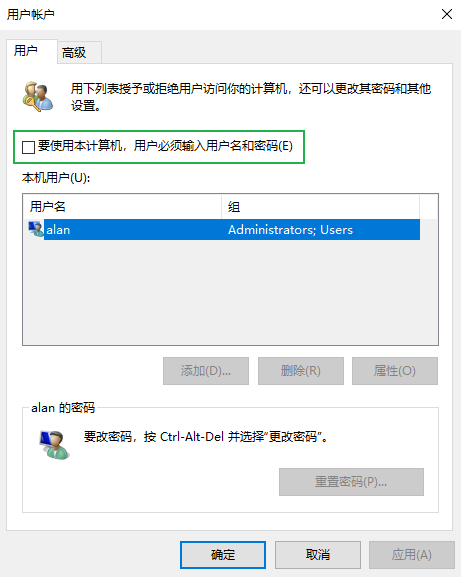
打开运行(Win + R) 输入 netplwiz 打开以下对话框, 取消勾选 要使用本计算机,用户必须输入用户名和密码 并点击 确定:
@echo off
SET /A delay = 1
:start
.\frpc.exe --config config.ini
SET /A delay = %delay% + %delay%
timeout /t %delay%
goto start
打开终端执行一下命令:
把 package.json 中 node-sass 的版本号改为 "npm:sass" 或者 "npm:sass@x.y.z"
将 webm 格式转换成 mp4 格式命令:
每个平台的下载地址格式:
在 Chrome 浏览器中使用以下代码:
document.body.addEventListener("touchmove", (e) => {
    console.log(e);
})
会在控制台看到一个警告信息:
[Violation] Added non-passive event listener to a scroll-blocking 'touchmove' event. Consider marking event handler as 'passive' to make the page more responsive. See https://www.chromestatus.com/feature/5745543795965952
/Users/{username}/Library/Containers/com.tencent.xinWeChat/Data/Library/Application Support/com.tencent.xinWeChat/2.0b4.0.9/Backup